Build Your Restaurant Accident Prevention Program
Without Starting From Scratch
Restaurant managers have plenty to do already.
Running shifts. Managing employees. Handling call-outs. Watching labor. Solving customer problems. Receiving deliveries. Training new hires. Keeping equipment working. And somehow, in the middle of all of that, they’re also supposed to think about workplace safety documentation.
Then someone says:
“You need a written Accident Prevention Program.”
Great.
Now what?
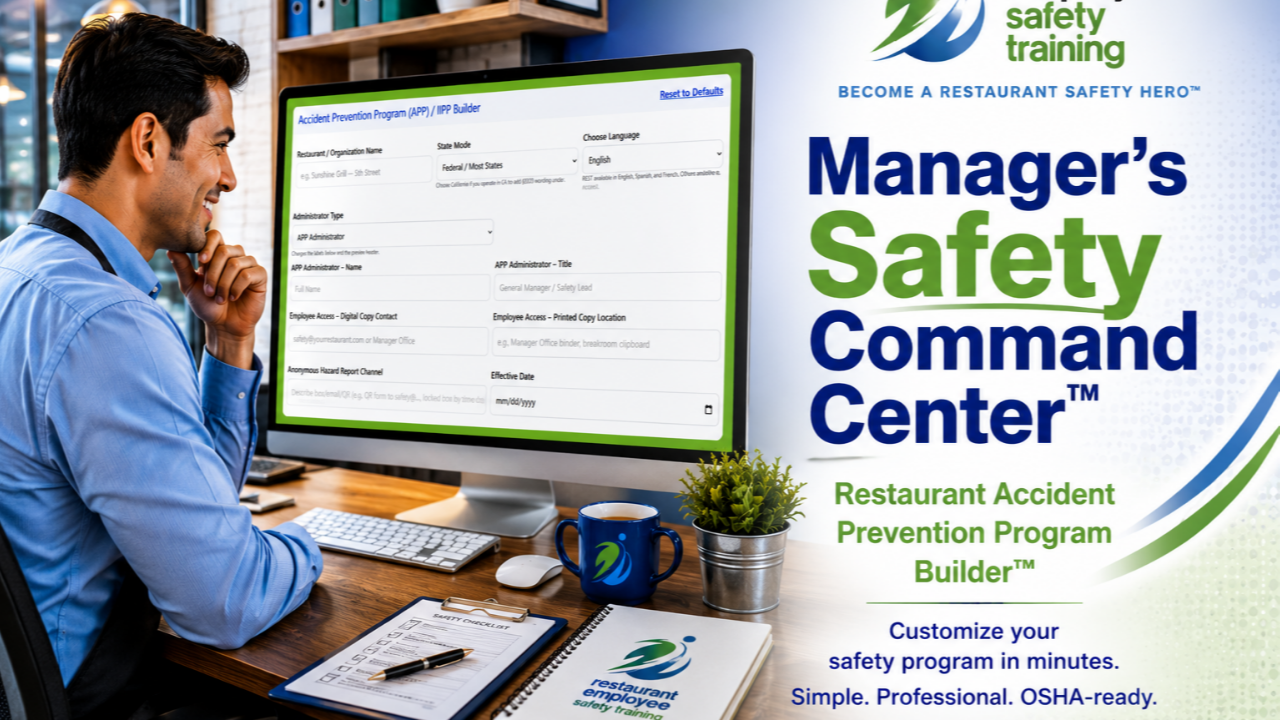
That is exactly why we built the Accident Prevention Program (APP) / IIPP Builder inside the Restaurant Manager’s Safety Command Center™.
Instead of handing restaurant managers another blank form or giant document and telling them to figure it out, the builder gives them a practical starting point they can customize for their own operation.
Because restaurants never slow down.
Your safety system has to work in the restaurant you actually run.
What Is an Accident Prevention Program?
An Accident Prevention Program is a written framework for how your organization approaches workplace safety.
It can document things such as who is responsible for safety, what employees are expected to do, how hazards are identified and corrected, how incidents are investigated, how employees receive safety training, and how safety records are maintained.
Those things may sound straightforward individually.
The difficult part is pulling them together into an organized written program that reflects what your restaurant actually does.
That's where the APP Builder helps.
Rather than beginning with a blank page, restaurant managers work through a guided system containing editable language for the major pieces of their safety program.
Start With the Information That Makes the Program Yours
The first section of the APP Builder asks for the basic information needed to begin customizing the program.
Managers can enter the restaurant or organization name, identify the APP administrator and title, establish an effective date, and document how employees can access the safety program.
There is even a place to identify the restaurant's anonymous hazard-reporting channel—whether that's an email address, QR form, locked box, or another method the restaurant has established.
The builder also includes a state mode, including a California option that adds applicable California-specific wording, and language options for the program.
That means you're not simply downloading a generic document and hoping somebody eventually remembers to personalize it.
You're building the program around your restaurant from the beginning.
Ten Editable Sections Help Managers Think Through the Program
The builder walks managers through ten major areas:
- Manager Responsibilities
- Employee Responsibilities
- Compliance
- Communication
- Worksite Analysis / Hazard Assessment
- Accident / Exposure Investigation
- Hazard Prevention & Control
- Training & Instruction
- Employee Access to the Plan
- Recordkeeping
And here's an important part:
The example language is editable.
We don't want a manager blindly printing a document because REST created it.
The point is to give managers a strong starting place and then let them adapt the language to how their own restaurant operates.
If your restaurant handles something differently, change it.
If you need to add something, add it.
If a procedure doesn't describe your operation, don't pretend that it does.
The tool helps eliminate the intimidating blank page without taking away the restaurant's responsibility to make the program its own.
Your Safety Program Should Explain Who Is Responsible for What
One of the first things the builder helps establish is responsibility.
Who administers the program?
What are managers expected to do?
What are employees expected to do?
How are safety expectations communicated?
How are hazards reported?
How are unsafe conditions corrected?
These aren't questions you want everyone trying to answer for the first time after somebody gets hurt.
The APP Builder provides editable examples for both manager responsibilities and employee responsibilities, helping restaurants put those expectations into writing before they're needed.
Connect Training to the Rest of Your Safety System
This is one of my favorite parts of the builder because an Accident Prevention Program shouldn't be a document that gets created, put in a binder, and forgotten.
Safety training should connect to what's actually happening in the restaurant.
The Training & Instruction section can document your training process, including onboarding, ongoing REST training, quizzes and certificates, job-specific instruction, and circumstances that may trigger retraining.
For example, retraining may be appropriate when employees take on new tasks, equipment or chemicals change, deficiencies are observed, or an incident or near miss shows that additional instruction is needed.
That turns training from:
“We showed them a safety video once.”
into:
“We have a process for keeping safety training going.”
And that's an enormous difference.
Identify Hazards Before They Become Accidents
The Worksite Analysis / Hazard Assessment section helps restaurants document how they're going to look for problems.
That can include regular inspections, checklists, assessments when equipment or processes change, tracking identified hazards, and documenting corrective actions.
This is also where different tools inside the Restaurant Manager's Safety Command Center™ begin working together.
A manager may identify a problem during an inspection, document the corrective action, and then connect that issue to relevant employee training.
Find the gap. Fix the gap. Document what you did. Reinforce the right behavior.
That's a safety system.
When Something Happens, Don't Just Document the Injury
The Accident / Exposure Investigation section gives managers a framework for documenting incidents and near misses and looking beyond simply recording what happened.
The goal is to look at causes and corrective actions.
What happened?
Where did it happen?
Why did it happen?
Is there a hazard that needs to be corrected?
Does a procedure need to change?
Does somebody need additional training?
And how will you verify that the corrective action was actually completed?
The APP Builder can work alongside the Incident Report tools in the Safety Command Center so information isn't just collected—it can become part of preventing the next accident.
Documentation Matters
Training is important.
Being able to show what you've done matters too.
The Recordkeeping section helps restaurants define how they'll maintain training completions, certificates, incident investigations, hazard assessments, and corrective-action records.
Within REST, the Training Tracker and Certificate Tracker can help managers keep training documentation organized while the other Safety Command Center tools support the rest of the restaurant's safety process.
Instead of safety information living on random pieces of paper, in somebody's inbox, and somewhere on the manager's computer, you can establish an actual system for how records will be handled.
Your Employees Need to Know How to Access the Program
A written program isn't very useful if nobody knows where it is.
That's why the builder includes an Employee Access to Plan section.
Managers can identify where a printed copy is kept, who employees should contact for a digital copy, or where employees can access it electronically.
Again, it's a small detail.
But good safety systems are built from lots of small details being handled before they become problems.
Preview It. Save It. Export It.
Once you've worked through the sections, the APP Builder doesn't leave your program trapped inside an online form.
You can build a preview, save your draft locally, export the finished program for printing as a PDF, or download a Word-compatible version for additional editing.
That means the final document belongs in your restaurant's safety system, not just ours.
Print it.
Save it.
Review it.
Update it as your operation changes.
And make sure the program accurately reflects what your restaurant actually does.
This Isn't About Creating More Paperwork
That's the bigger point.
We didn't build the Accident Prevention Program Builder because restaurant managers need another form.
You need fewer things to figure out from scratch.
The Restaurant Manager's Safety Command Center™ was designed to bring the pieces together—training, certificates, documentation, hazard prevention, incident reporting, written programs, checklists, and other practical safety tools—in one place.
The APP Builder is one piece of that system.
You still need to review your program, customize it for your restaurant, keep it current, and make sure you're meeting the requirements that apply to your operation and location. The builder isn't legal advice and doesn't replace applicable federal, state, or local requirements.
But you don't have to begin with a blinking cursor and a blank Word document.
We've already given you somewhere to start.
Build Your Safety System Before the Next OUCH!
Restaurant accidents rarely happen because someone woke up that morning planning to get hurt.
They happen when little gaps stay open.
A hazard nobody corrected.
Training nobody reinforced.
An incident nobody learned from.
A responsibility nobody clearly assigned.
A document nobody created.
LOT™, NOT™, NOD™, and TMT™ love those little gaps.
The Accident Prevention Program Builder helps you start closing them.
Explore the Restaurant Manager's Safety Command Center™ and see how the APP Builder works together with the rest of your restaurant safety system.
Get instant access to the REST Compliance Protection System™
Trusted by restaurant owners and franchise operators to document safety training and reduce compliance risk.
No contracts • Cancel anytime • Setup in minutes • No IT required.
Have Questions About REST? Let’s Talk Safety.
Whether you’re training 5 employees or 500, we’re here to help you protect your team, document compliance, and save on long-term costs. Fill out the form and we’ll be in touch ASAP.
By submitting this form, you agree to receive safety-related emails from Restaurant Employee Safety Training.
We respect your time and will only contact you with helpful information—no spam, ever.