Restaurant Incident Report Log
Document It, Follow Up, Fix It
Something happens during a shift.
An employee slips near the dish area. Someone gets burned. A box falls from a shelf. An employee almost gets hurt but doesn't. A piece of equipment causes a problem. A hazard is discovered that needs to be corrected.
Everybody knows about it when it happens.
But three days later?
The details are already getting fuzzy.
Who was there? What exactly happened? What needed to be fixed? Who was supposed to follow up? And most importantly:
Did anyone ever make sure it actually got resolved?
That's why the Restaurant Manager's Safety Command Center™ includes the Incident Report Log—a simple, mobile-friendly tool designed to help restaurant managers document workplace incidents, track follow-up, and keep important information organized in one place.
Why Restaurant Incident Reporting Matters
Restaurants move fast.
That means an employee accident or workplace incident can happen in the middle of a dinner rush, get discussed for five minutes, and then disappear under the next hundred things the manager has to handle.
But the incident itself may be telling you something important.
Was there a wet floor that keeps becoming a problem?
Is a piece of equipment creating the same hazard repeatedly?
Did an employee need additional training?
Was a corrective action identified but never completed?
OSHA encourages employers to investigate not only incidents in which someone was injured, but also close calls or near misses where someone could have been injured under slightly different circumstances. The purpose is to identify hazards and safety-program weaknesses and take corrective action before another incident occurs.
That's where good incident documentation becomes much more than paperwork.
It gives you information you can use to prevent the next OUCH!
What Is a Restaurant Incident Report?
A restaurant incident report creates a written record of something that happened at the workplace.
Depending on the situation and the restaurant's own procedures, that might involve an employee injury, workplace accident, near miss, unsafe condition, equipment-related incident, or another event management needs to document and follow through on.
A useful restaurant incident report form or workplace incident report should help capture the basic facts while they're still fresh.
That's exactly what the REST Incident Report Log is designed to help managers do.
Instead of trying to remember where the paper form went—or writing a note that disappears underneath the schedule—you can add the incident directly to the log and keep its follow-up attached to it.
Document Restaurant Incidents While the Details Are Fresh
One of the biggest benefits of a digital incident report log is simple:
You can document what happened when it happens.
The REST Incident Report Log is mobile-friendly, so a manager doesn't necessarily have to wait until later to get back to an office computer.
Create the incident record and capture the important information before the shift, the next emergency, or plain old human memory gets in the way.
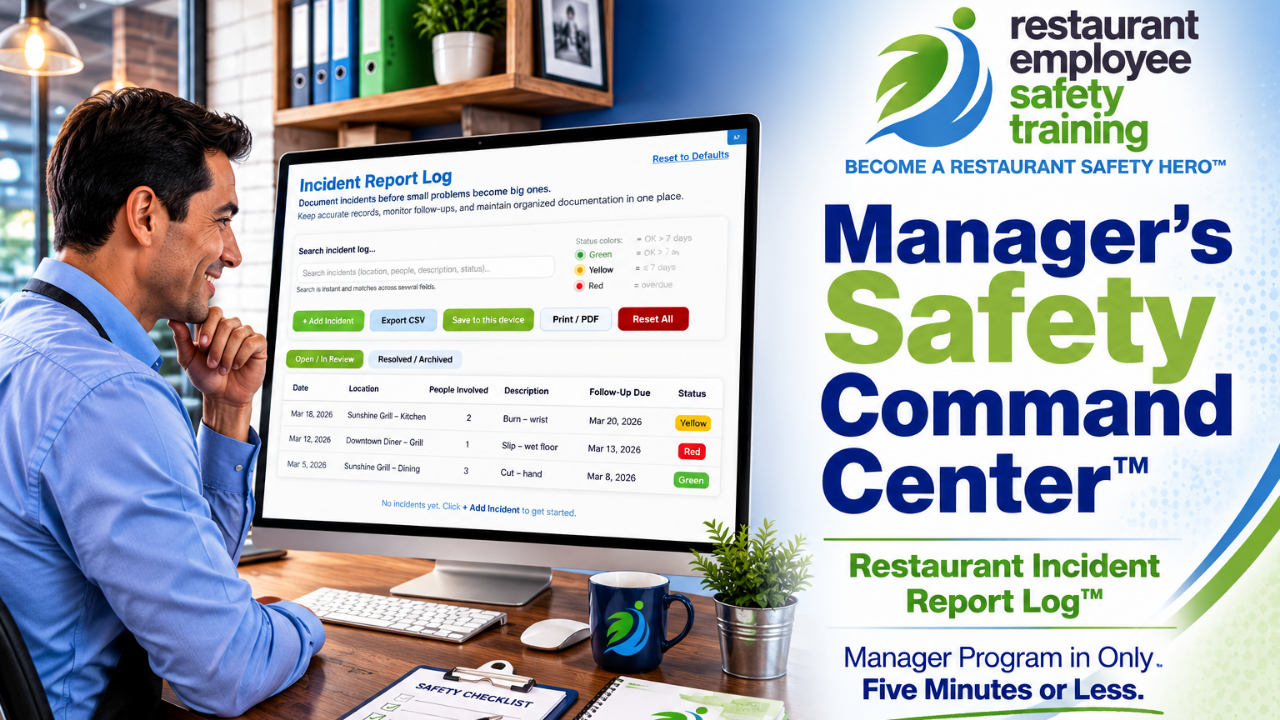
The log organizes incidents using information such as the date, location, people involved, description, follow-up due date, and status.
That gives managers a consistent place to record incidents instead of having information scattered among notebooks, emails, texts, paper forms, and someone's memory.
An Incident Report Is Only the Beginning
Here's the part that can easily get missed.
Documenting an incident doesn't fix the problem that caused it.
If an employee slips because of a recurring leak, completing an employee accident report doesn't repair the leak.
If somebody gets cut because a procedure isn't being followed, writing down what happened doesn't provide the retraining.
If a manager discovers an unsafe condition, recording it doesn't make the hazard disappear.
Someone still has to follow up.
That's why the REST Incident Report Log doesn't stop at documenting the original workplace incident.
Managers can assign a follow-up due date and track the incident until it is resolved.
That turns an incident report from a record of what went wrong into a management tool for keeping track of what needs to happen next.
See What Still Needs Your Attention
Restaurant managers already have enough things to remember.
The Incident Report Log helps make follow-up visible with easy-to-understand status indicators:
Green — resolved or follow-up is more than seven days away
Yellow — follow-up is due within seven days
Red — follow-up is overdue
You don't have to remember that something from two weeks ago still needs attention.
The log helps show you.
Managers can also separate Open / In Review incidents from Resolved / Archived incidents, making it easier to focus on what still needs action without losing the history of what has already been completed.
Search Your Restaurant Incident Records
Imagine trying to answer this question six months from now:
"Didn't we have another incident involving that piece of equipment?"
With paper forms, you may be heading for a filing cabinet.
With the Incident Report Log, managers can search incident records across multiple fields, including location, people, description, and status.
That can make it much easier to look for previous incidents and spot patterns.
And patterns matter.
One isolated incident may look like bad luck.
Three similar incidents involving the same location, task, piece of equipment, or procedure may be telling you that something needs attention.
Good documentation helps you see what memory can miss.
Near-Miss Reporting Can Help Prevent Employee Injuries
Not every restaurant safety incident ends with somebody getting hurt.
Sometimes the tray falls and misses the employee.
Sometimes somebody catches themselves before they fall.
Sometimes equipment malfunctions but nobody happens to be standing in the wrong place.
Those situations are easy to dismiss because technically, "nothing happened."
But something almost happened.
OSHA specifically encourages investigation of close calls or near misses because they can reveal hazards before those hazards result in an injury.
That makes your restaurant's incident reporting process useful for more than employee accident reports.
It can become part of your accident prevention system.
Keep Your Incident Log Organized Without Sending Your Data to a Server
The REST Incident Report Log stores its data locally on the device being used rather than on a REST server.
That gives the restaurant control over where its incident information is maintained.
Managers can save their data to the device and create backups. The tool also provides options to export data to CSV, import CSV files, and print or save the incident information as a PDF.
That means you aren't trapped inside the tool.
You can maintain backups and export information for your restaurant's own recordkeeping procedures.
And because locally stored information depends on the device and your backup practices, using the backup/export features should be part of your routine.
Restaurant Incident Reports and OSHA Records Are Not the Same Thing
This distinction is important.
The REST Incident Report Log is an internal restaurant management and follow-up tool. It does not automatically replace OSHA recordkeeping or reporting requirements that may apply to your establishment.
For employers subject to OSHA recordkeeping requirements, OSHA uses Forms 300, 300A, and 301 for recordable work-related injuries and illnesses. OSHA says a Form 301—or an equivalent form containing the required information—must be completed for each recordable case entered on the OSHA 300 Log, generally within seven calendar days after receiving information that a recordable injury or illness occurred.
There are also separate requirements for reporting certain severe incidents directly to OSHA. Work-related fatalities generally must be reported within 8 hours, while qualifying in-patient hospitalizations, amputations, and losses of an eye generally must be reported within 24 hours.
So think of the Incident Report Log as part of your restaurant's internal safety management system—a place to document, track, investigate, and follow up—not as a substitute for determining and meeting any OSHA, state-plan, workers' compensation, insurance, or other reporting obligations that apply to your restaurant.
Better Incident Documentation Can Lead to Better Safety Training
Here's where this tool starts connecting to the rest of the Restaurant Manager's Safety Command Center™.
Suppose you notice several incidents involving cuts.
That may tell you something.
Perhaps employees need a refresher on knife safety.
Maybe you see repeated burns.
Perhaps it's time to reinforce hot-surface or burn-prevention training.
Maybe slips keep appearing in your incident records.
Now you've got a reason to look at where they're occurring, what is causing them, and whether employees need additional training or a procedure needs to change.
The incident isn't just something to file away.
It's information.
And when you connect that information to training, corrective action, documentation, and follow-up, you're building a safety system instead of simply collecting paperwork.
From Incident Report to Corrective Action
A strong restaurant safety process shouldn't end with:
"Yep. We filled out the form."
It should move through a much more useful cycle:
Something happened → Document it → Determine why → Correct the problem → Train when needed → Follow up → Verify that it was resolved.
That's also why the Incident Report Log belongs alongside tools such as the Accident Prevention Program Builder™, Training Tracker, Certificate Tracker, safety training, quizzes, and other resources inside the Restaurant Manager's Safety Command Center™.
Each tool handles a different piece.
Together, they help managers see the larger picture.
Stop Letting Incident Reports Disappear Into a Filing Cabinet
Nobody wants restaurant accidents.
But when an incident or near miss does occur, it can give you valuable information about what needs attention.
Document it.
Follow up on it.
Look for patterns.
Correct the hazard.
Use it to identify training needs.
And keep the record somewhere you can actually find it again.
The REST Incident Report Log was built to make that process easier for busy restaurant managers.
Because the goal isn't simply to document the last accident.
The goal is to help prevent the next one.
One More Tool Inside the Restaurant Manager's Safety Command Center™
The Incident Report Log is part of the Restaurant Manager's Safety Command Center™—a collection of practical tools designed to help restaurant managers train employees, document safety activity, build written programs, track completion and certificates, prepare for emergencies, and follow through when something goes wrong.
Restaurants never slow down.
Your safety training documentation can't afford to disappear when things get busy.
Get instant access to the REST Compliance Protection System™
Trusted by restaurant owners and franchise operators to document safety training and reduce compliance risk.
No contracts • Cancel anytime • Setup in minutes • No IT required.
Have Questions About REST? Let’s Talk Safety.
Whether you’re training 5 employees or 500, we’re here to help you protect your team, document compliance, and save on long-term costs. Fill out the form and we’ll be in touch ASAP.
By submitting this form, you agree to receive safety-related emails from Restaurant Employee Safety Training.
We respect your time and will only contact you with helpful information—no spam, ever.